Become a First-Wave Coach →
For personal trainers · iPhone

Plan the workout.
Send it to your client.
See every set.

Your client trains from your plan and logs every set — in the app, on Apple Watch, or straight from a link in the browser. You see it all as it happens, without WhatsApp threads, spreadsheets or notes.

14-day free trial · No card · Limited Founding spots
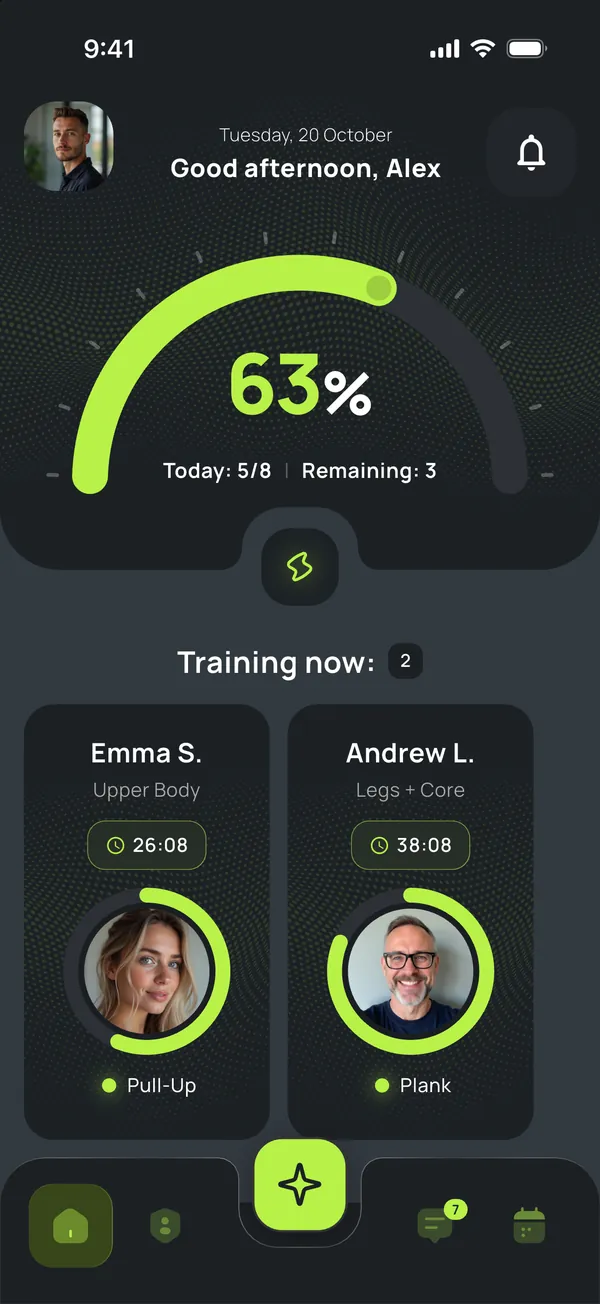
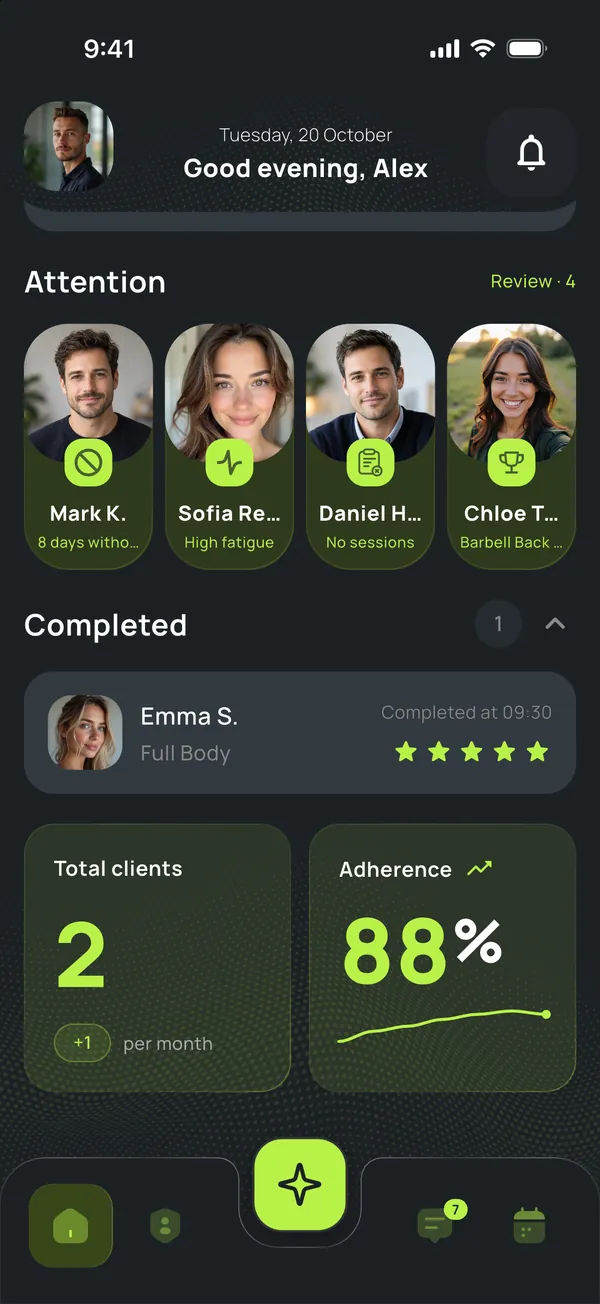
Trainer home: who’s training right now
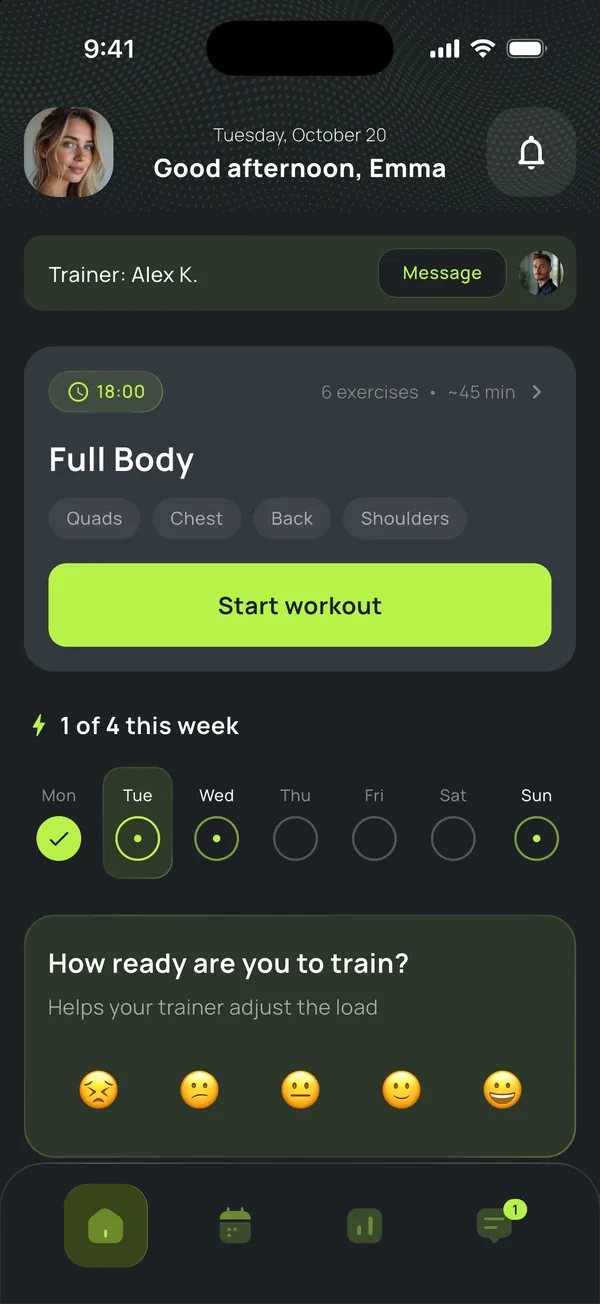
Client home: today’s workout
The mess
01

Your job —to coach.Ours —to clear the rest.

What the day actually looks like
07:12
Andrew moved Tuesday to Wednesday.
WhatsApp
09:40
Maria asks: “what was the weight for bench last time?”
Telegram
13:22
You forget to update Tom’s sheet after the session.
Google Sheets
—
Lena hasn’t messaged in 9 days. You haven’t noticed.
Nowhere
How it works

From the plan
to every set.

Built around a trainer’s real day, not a feature list.

Getting started

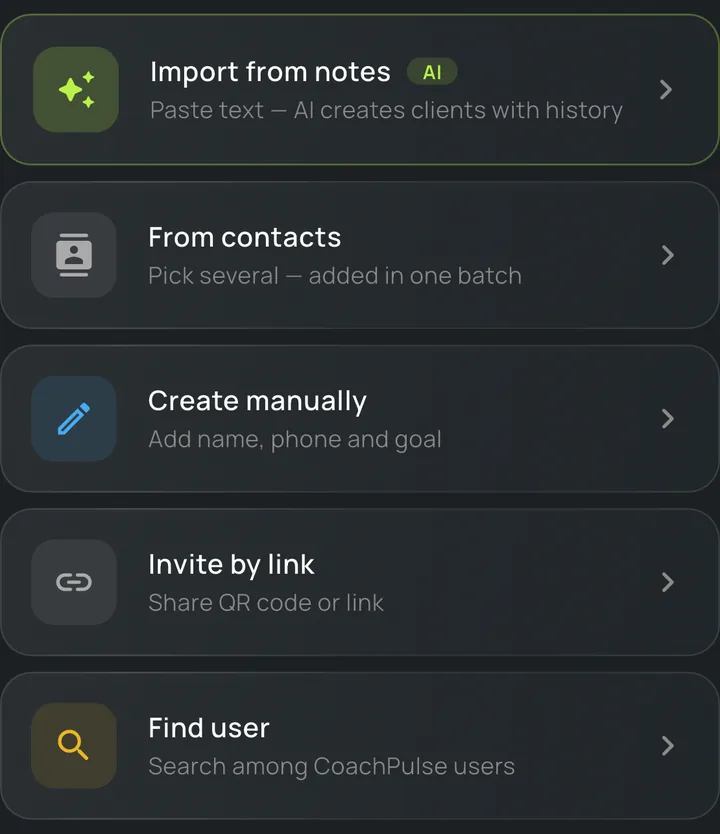
Add clients any way you like

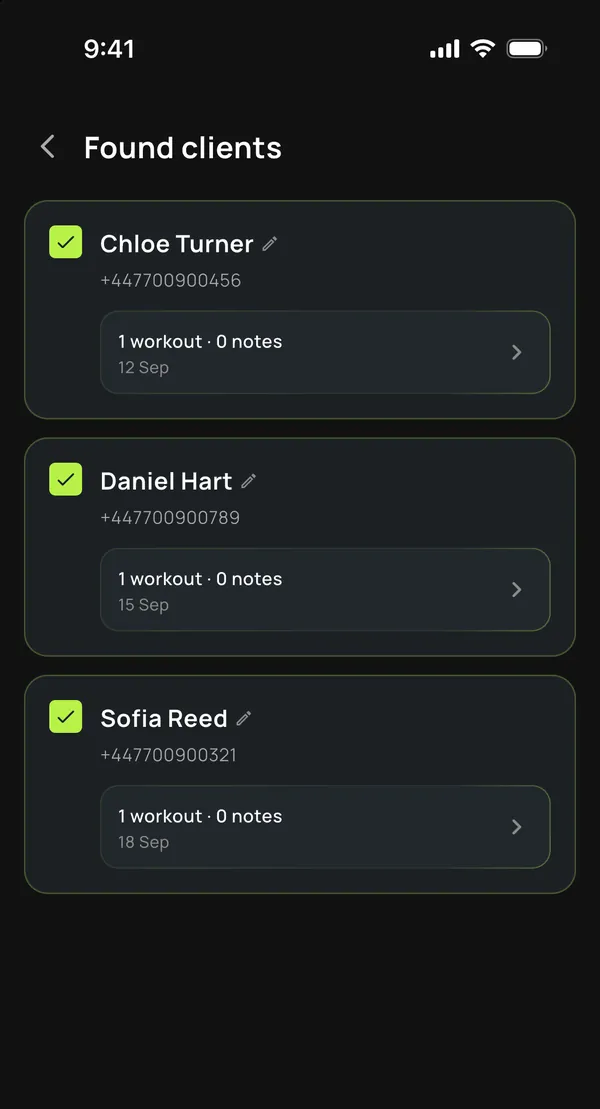
Paste your notes or chat screenshots — AI sorts them into clients and their workout history, and you review before anything is saved. Or add from contacts, by hand, or with a link or QR code.

  • ›Import from notes and screenshots, workout history included
  • ›Several clients from your contacts at once
  • ›A personal link, code or QR so clients can join on their own
Clients found after importing notes
Five ways to add a client
Plan

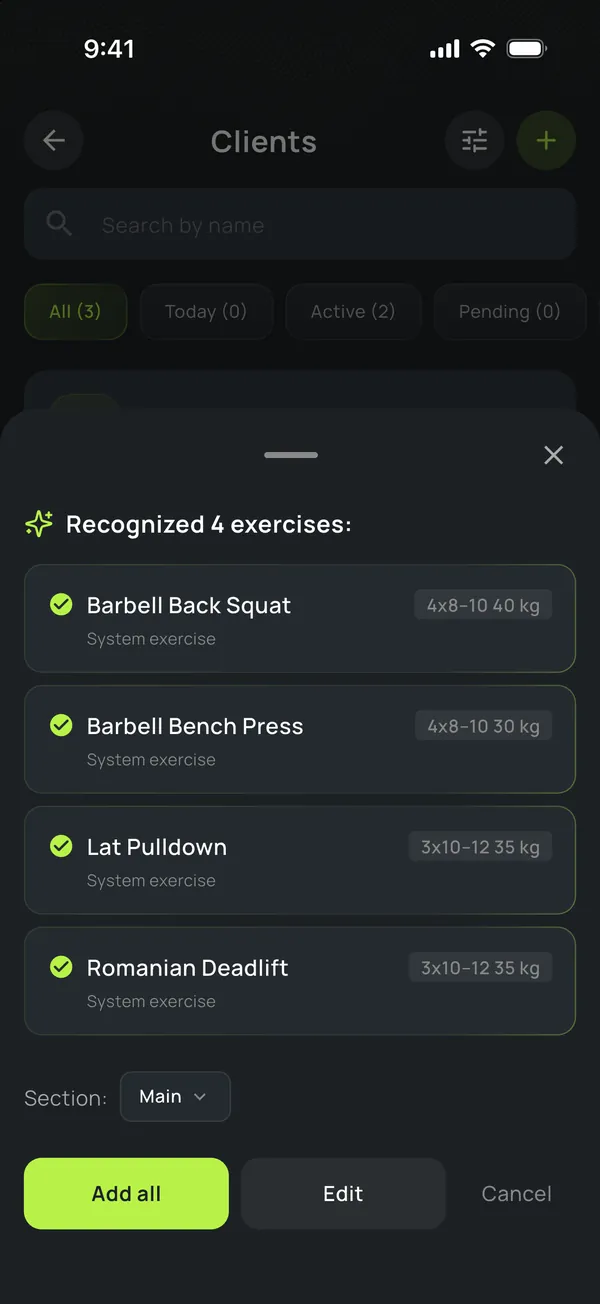
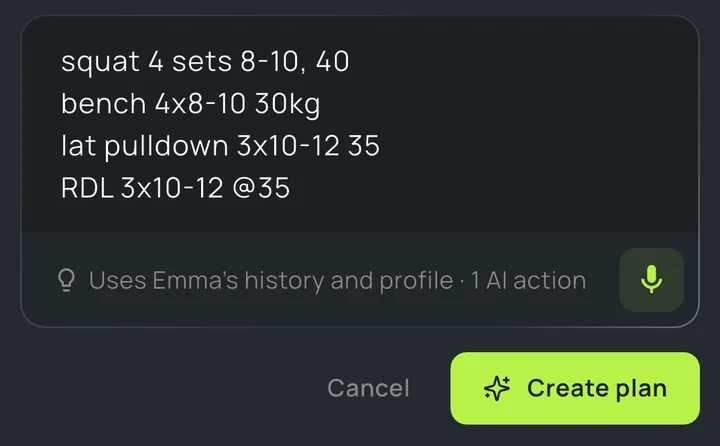
Just paste the text — CoachPulse builds the workout

Write it your way, even in shorthand, or dictate it. Exercises, sets and weights get recognized — you just check and publish.

  • ›“squat 4x8-10 40” becomes an exercise with sets
  • ›Leave it empty for a draft from the client’s history and profile
  • ›Nothing is saved until you hit Publish
Recognized exercises with sets and weights
Workout text the way a trainer writes it
For your client

Clients train even without the app

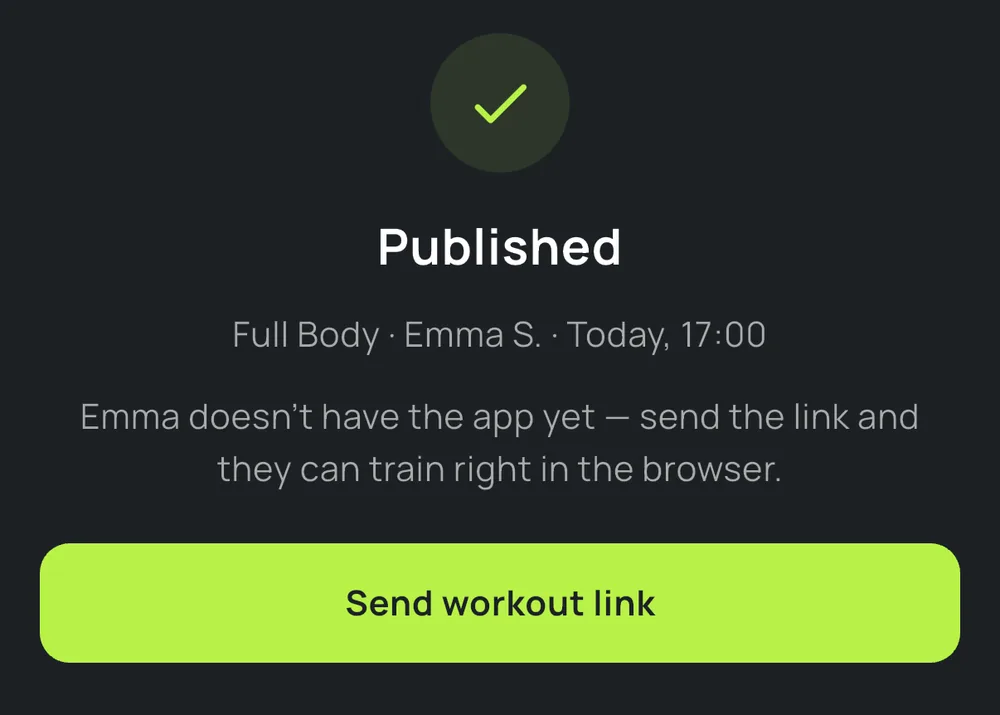
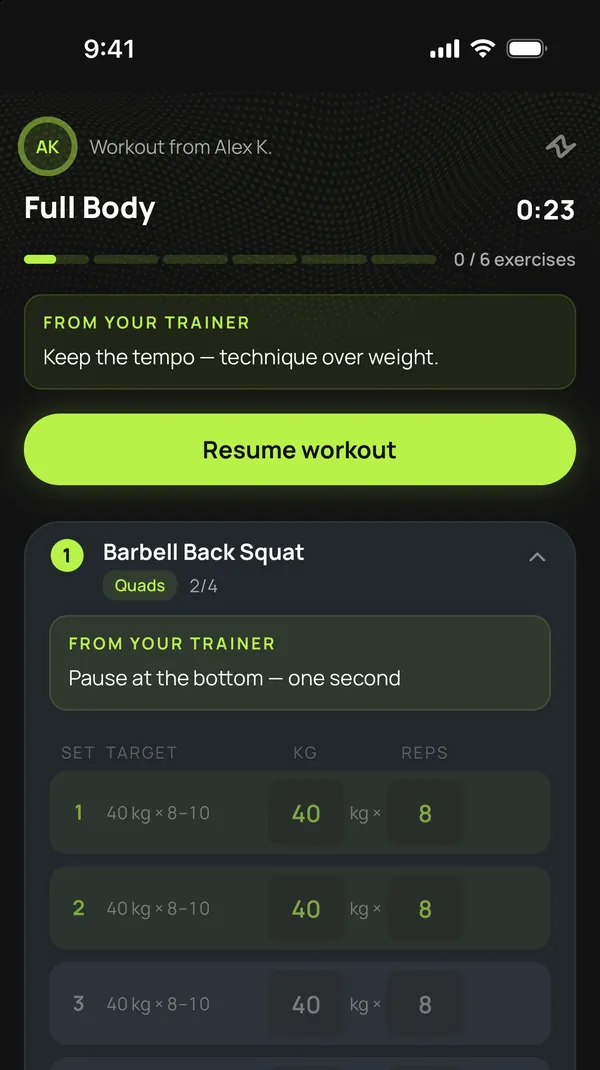
Send the workout to the app or just as a link. Your client opens it in the browser, sees the exercises and your cues, and logs every set — you get it all recorded.

  • ›The link works on any phone, Android included
  • ›Your cues for the whole workout and for each exercise
  • ›When the client signs up, their history comes with them
Workout published — send the link
or
Client home: today’s workout
In the app
Workout from a link in the browser
In the browser
Live

See the workout as it happens

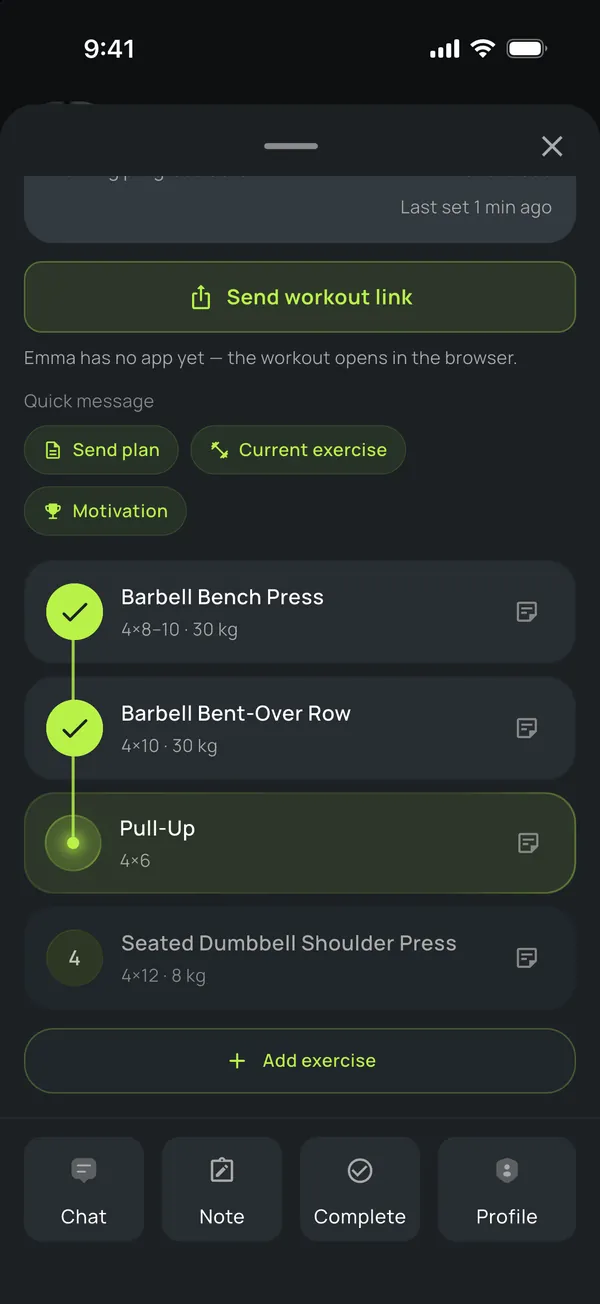
Sets show up on your phone as your client logs them. Nudge them mid-session.

  • ›Workout progress and time since the last set
  • ›Quick messages: plan, current exercise, motivation
  • ›Who’s training right now, on your home screen
Client’s workout live: completed exercises
In the gym

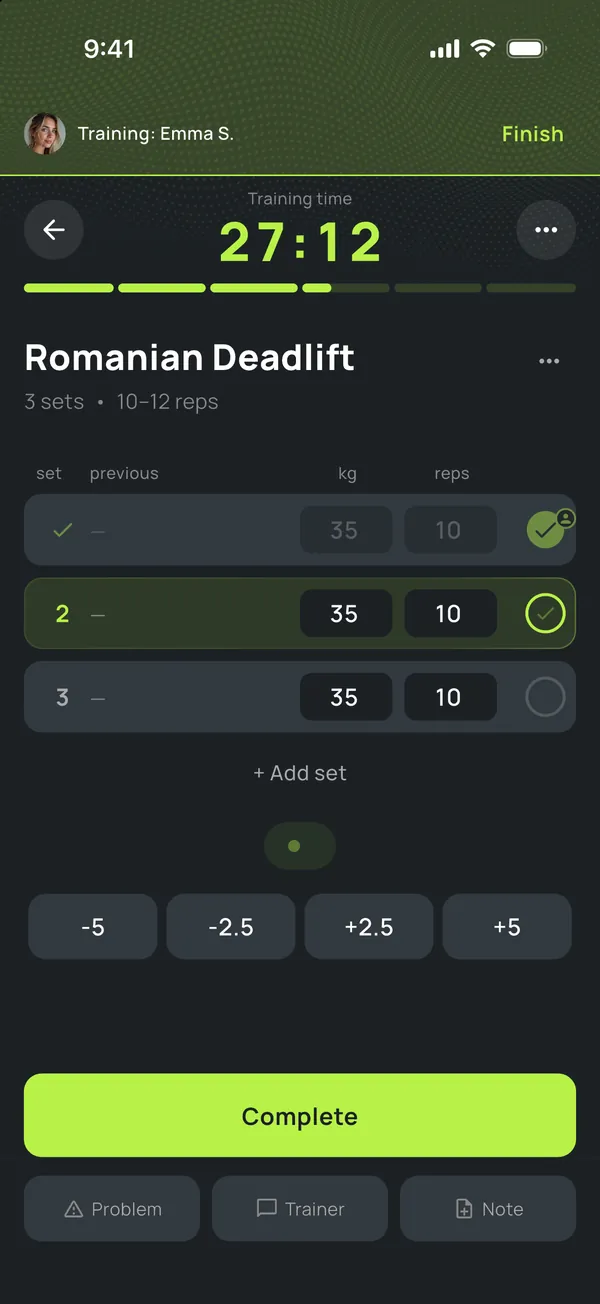
Training in person? Log sets for your client

When you coach in person, log the sets yourself. Every set goes straight into the client’s history, and the report shows what the trainer recorded.

  • ›The whole plan on one screen, exercise by exercise
  • ›Weight and reps in one tap, or “same as last time”
  • ›A post-workout report you can correct
Trainer logging sets for a client
Attention

See who needs
your attention today.

CoachPulse spots days without training, high fatigue, clients with no plan and new PRs — and shows you who to message today. Two signals per client at most, no noise.

Trainer home: clients who need attention
  • Mark K.8 days without training
    Nudge them and offer a time
  • Sofia R.High fatigue
    Volume +38% above average
  • Daniel H.No sessions
    Plan their week
  • Chloe T.Personal record
    Congratulate them — it goes to the chat

Message, plan, open the profile or snooze — right from the card.

Chat

Review their form right in the chat

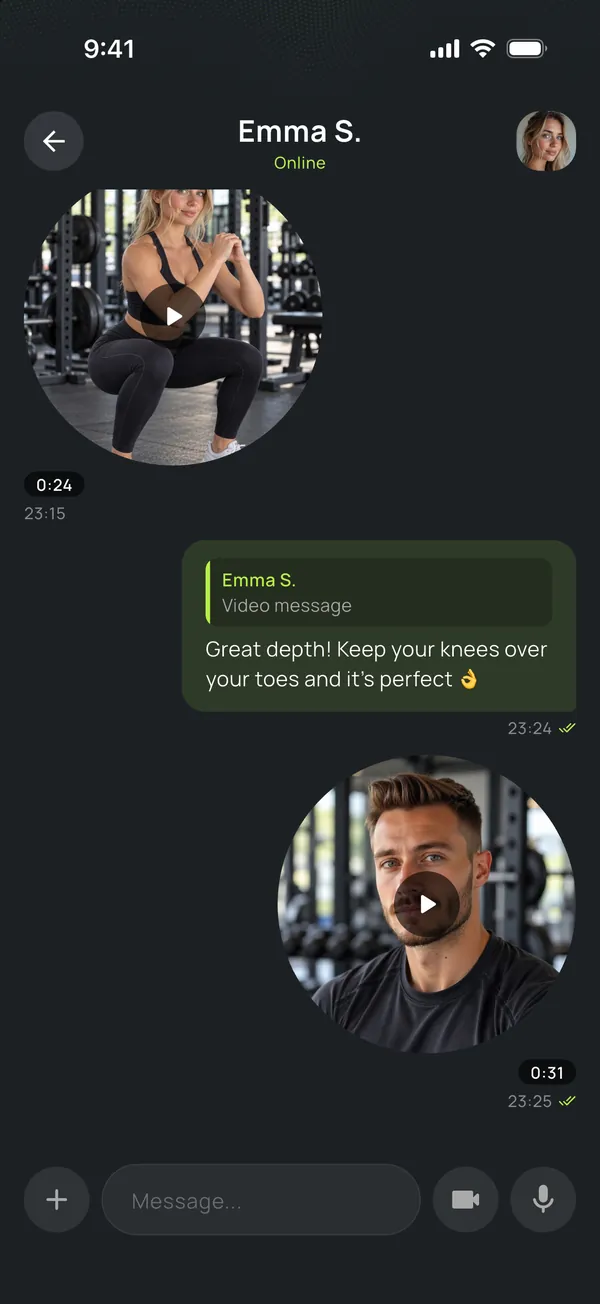
Your client sends a video of the set — you reply with a video note or a voice message to that exact message. No WhatsApp, no forwarded files.

  • ›Video notes up to 60 s, videos, photos and albums
  • ›Voice messages and replies to a specific message
  • ›Workouts as cards right in the chat
Chat with a client: form video and the trainer’s reply
Assistant

An assistant that
knows your clients.

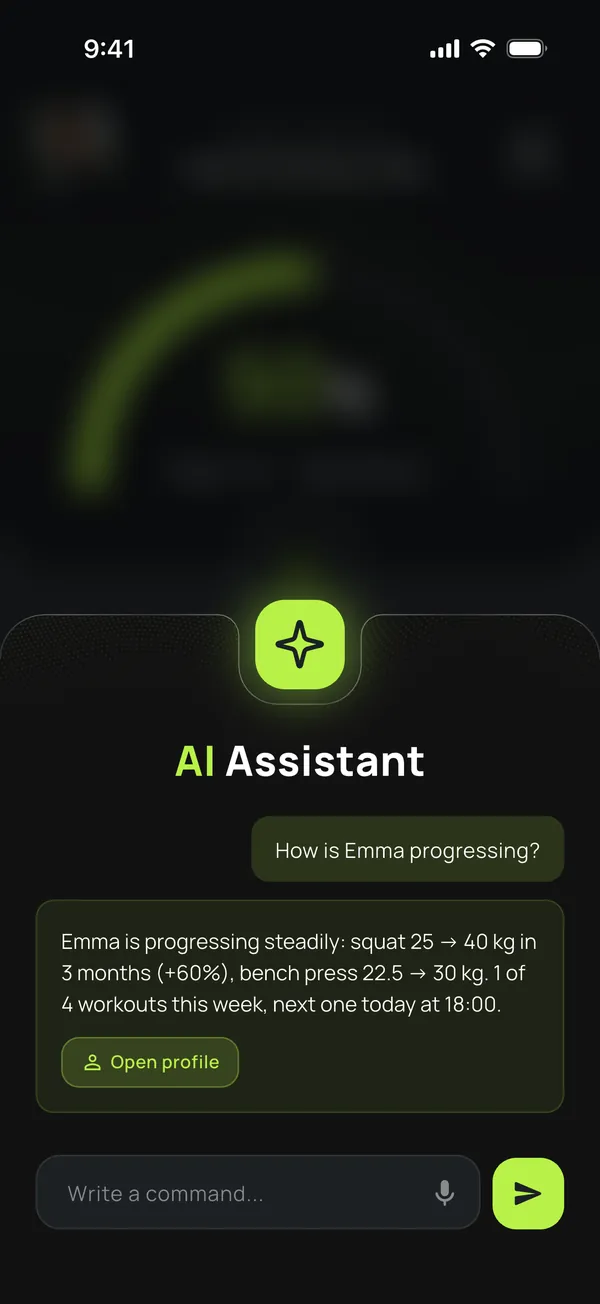
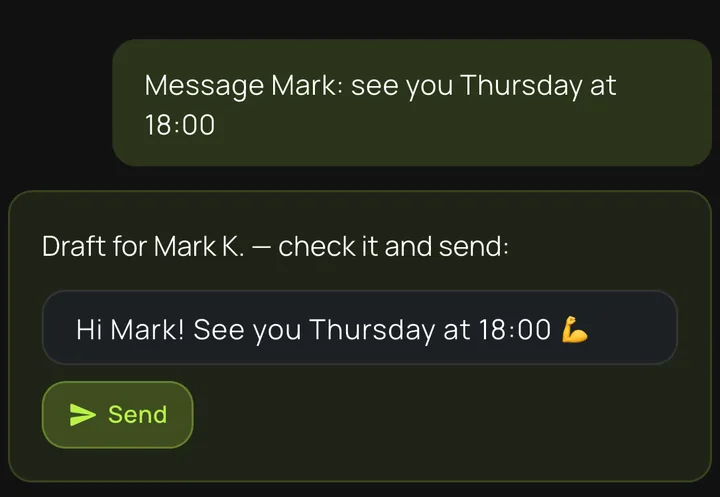
Ask how a client is progressing or dictate a message — the assistant drafts it, you check it and send. Nothing runs without your confirmation.

Message Mark: see you Thursday at 18:00
“how is Emma progressing?”“who missed a workout this week?”“note: Daniel’s back hurts today”
Voice or text. English, your language, mixed — doesn’t matter.
Assistant answering about a client’s progress
Message draft — check it and send
For your client

Your client always
knows what to do.

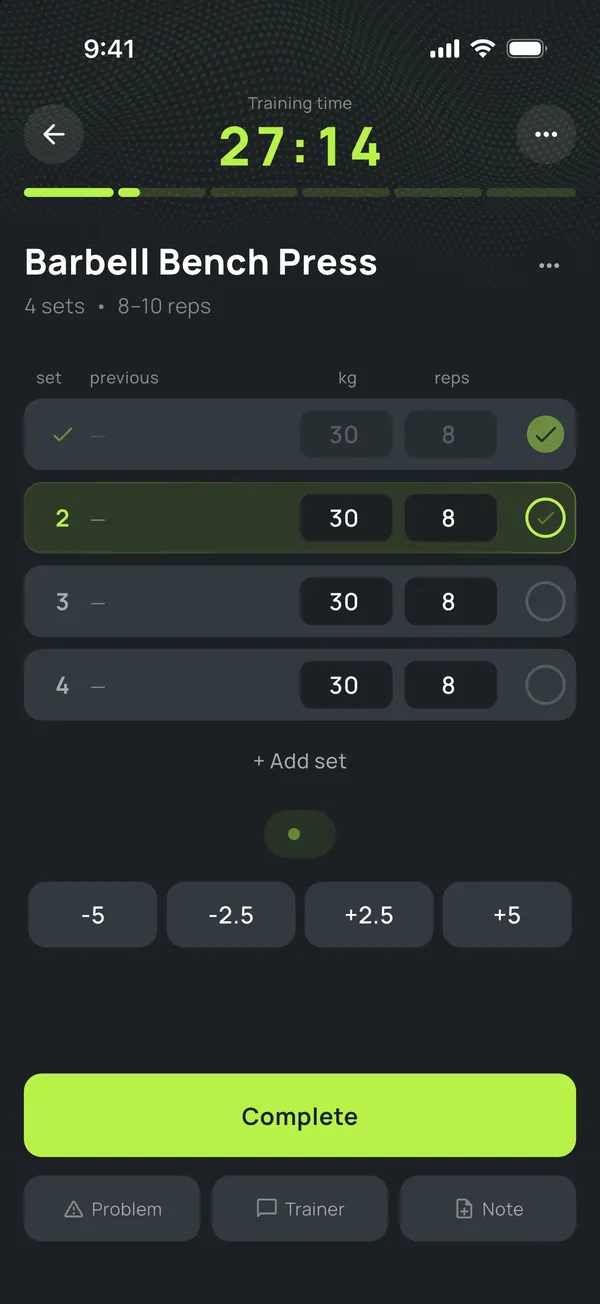
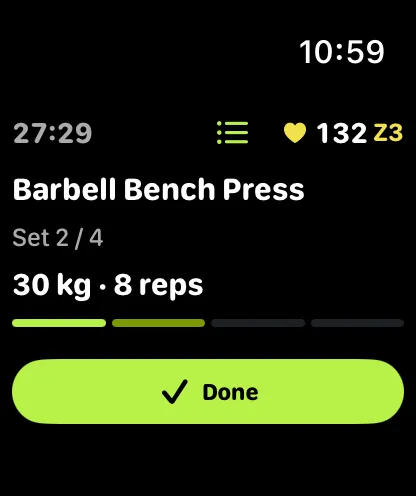
Today’s plan, history and progress — on iPhone and Apple Watch. Your client logs sets, gets a rest timer and your cues, and your service feels like a real product.

Client logging sets
On iPhone
Current set on Apple Watch
On Apple Watch
›Set, rest and heart rate on the wrist›Streaks, PRs and mood check-ins›Chat with you: voice, photos, video›Their data stays theirs — even if they switch trainers
Progress

Progress you can see, no guesswork

Weights, PRs and 1RM per exercise over 30 days, 90 days or all time — and whether each set landed in the plan’s range.
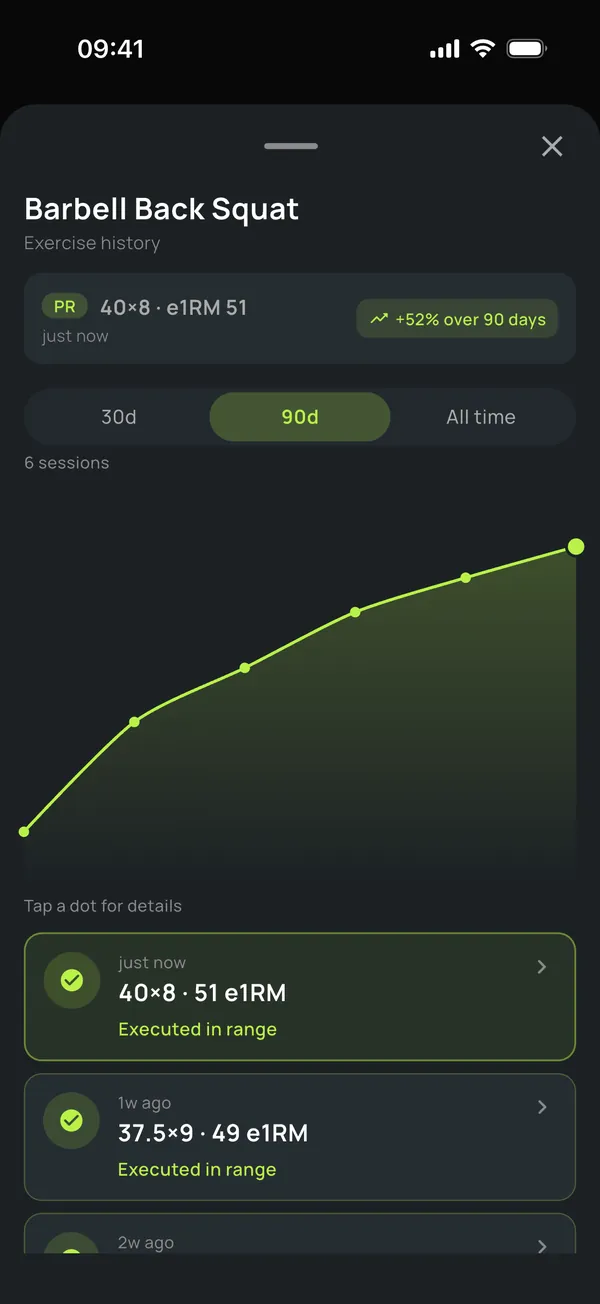
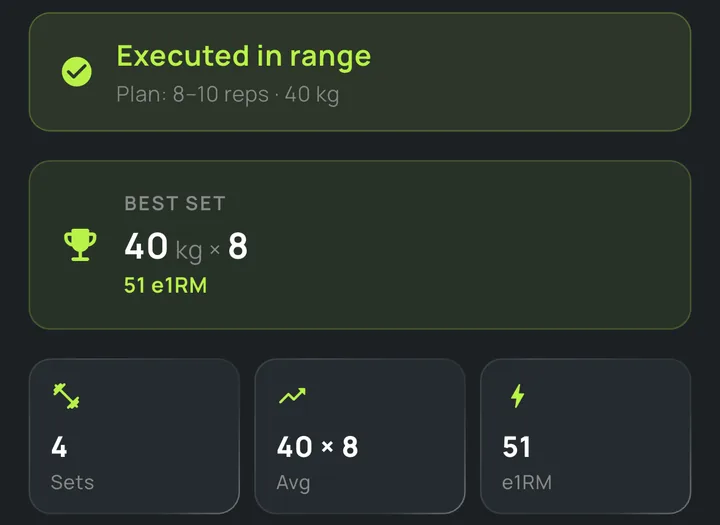
Exercise history: 90-day chart
Best set and estimated 1RM
Packages

Stop counting sessions by hand

Packages, attendance and payments on the client’s profile. Your client sees how many sessions are left too.
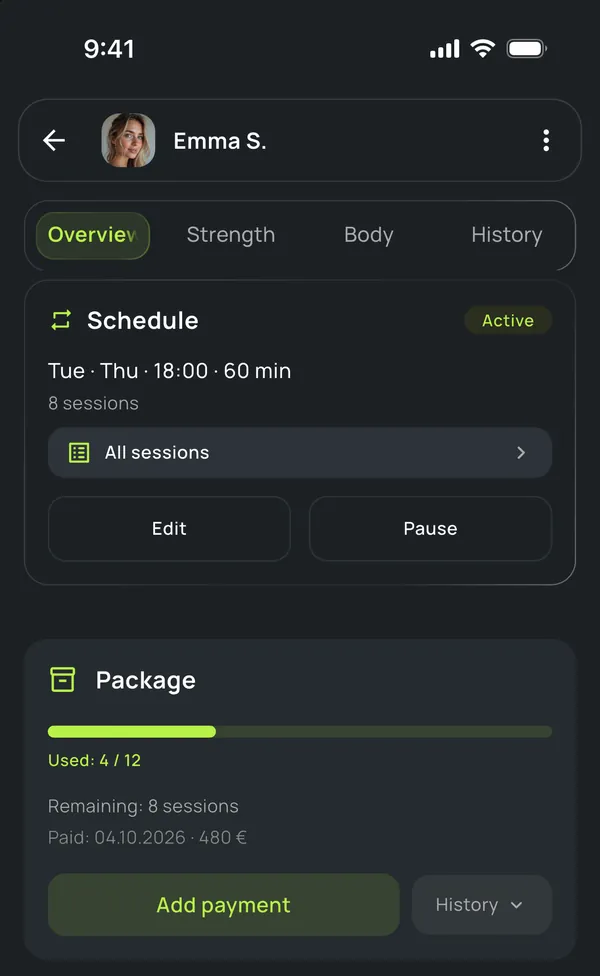
Session package: 4 of 12 used
You’ve seen enough

You already know
if this is built for you.

Founding spots are limited. A lower Pro price for life, while your subscription stays active.

Become a First-Wave Coach →
No credit card · 2-min sign-up · Your data is yours
The day of a solo coach, abridged
2 AM voice messages·4-day silence·15 unread DMs·a lost client·a missed session·a forgotten weight·“can you resend my plan?”·another spreadsheet tab·“wait, which week am I on?”·a ghosted check-in·2 AM voice messages·4-day silence·15 unread DMs·a lost client·a missed session·a forgotten weight·“can you resend my plan?”·another spreadsheet tab·“wait, which week am I on?”·a ghosted check-in·2 AM voice messages·4-day silence·15 unread DMs·a lost client·a missed session·a forgotten weight·“can you resend my plan?”·another spreadsheet tab·“wait, which week am I on?”·a ghosted check-in·
Before & after
A week with CoachPulse

Same week.
Less chaos.

Four ordinary moments from a coach’s work — and how they look when the system keeps up with your day.

MON · 07:12
Mark hasn’t trained in 8 days. You see it before he drifts away.
Attention
TUE · 09:04
You hold the mic: “message Mark: see you Thursday at 18:00”. Check the draft — sent.
Assistant
WED · 18:12
Mark logs bench press: 4 × 8 × 30 kg. You see every set live.
Live workout
FRI · 20:45
A new request from your public page: the client picked a free slot on their own. You never promoted it.
Public trainer page
The fit
For you

If you area solo coachwith 5–30clients.

  • +You work from your phone throughout the day
  • +You track sessions in notes, sheets, or chats
  • +You know your clients personally and don’t want to lose touch
  • +You want a tool, not “another platform”
vs
Not for you

If you runa gym chainor a largeteam.

  • —You need corporate roles and permissions
  • —You have dozens of coaches on payroll
  • —You manage 100+ clients across a team
  • —You need white-label for a chain

This is a tool for coaches who work with people personally. Nothing extra.

Why we’re building this

CoachPulse is being built for solo coaches who do extraordinary work every day with tools that were never made for them.

We’re not building “another platform.” We’re building a practical tool for the coach’s real workday: between sessions, on the gym floor, on the road, in chats with clients.

The first wave of coaches gets Founding pricing and a real seat at the table from day one.

— The CoachPulse team
Honest answers

Questions coaches
actually ask.

Is it available now?
Yes — CoachPulse is on the App Store for iPhone. Download it free and start a 14-day trial, no card required. The first wave of trainers gets Founding pricing: a lower Pro price for life, while the subscription stays active. Founding spots are limited.
What does it cost?
14 days free for everyone — no card, no automatic charges. After that, the free plan for up to 2 clients or Pro for up to 30. The first wave of trainers gets Founding pricing for life, while the subscription stays active. The App Store shows the exact price in your currency. No per-client fees, ever.
Does my client need an iPhone?
You need an iPhone; your client doesn’t. A client with an iPhone trains in the app and on Apple Watch; anyone else trains from a link in the browser — they see the exercises, log every set, and it all reaches you. There is no Android app yet.
What happens to my client’s data if they switch coaches?
Your client’s training history belongs to them, permanently. If they leave, they keep the app and their data: you lose access, they don’t lose their progress. Either of you can download your data or delete your account at any time. This isn’t a setting — it’s a principle the product is built on.
How is it different from other trainer apps?
Most are built for online coaching at scale, with hundreds of remote clients, or they revolve around nutrition. CoachPulse is built for the personal trainer who works next to their clients: you see every set live, log sets for your client in the gym, build plans from text or voice, and the app tells you who needs attention. We don’t do meal plans — we’d rather do training really well.
First wave · Limited spots

Shape the product
from day one.

A limited number of spots for trainers who want to build this with us. You get Founding pricing for life; we get your honest feedback. Both sides win.

  • A lower Pro price — for life
  • A direct line to the team building it
  • First to try every new feature
14-day free trial, no card. Founding pricing holds while your subscription stays active.
Your data is yours — export it any time. Privacy
Limited
Founding spots
Pro
for life
14d
Free trial
0
Per-client fees
Now on the App Store

Your clientsdeserve betterthan screenshots.

LimitedFounding spots
14dFree trial
0Per-client fees